Quick Summary
- Cloud migration can expose architecture, database, and network limitations that were less visible in an on-premise environment.
- Avekshaa’s Application Migration Assurance helps validate performance, availability, and scalability risks before, during, and after migration.
- Cloud Engineering readiness reviews help align workload design, infrastructure sizing, and cost with real usage patterns.
- Realistic load testing and transaction-level monitoring are essential before go-live and during the first 90 days after migration.
- Performance baselines make it easier to prove whether the new cloud environment is faster, slower, or simply behaving differently.
Did you know? The AWS Well-Architected Framework treats performance efficiency as one of six core cloud architecture pillars and recommends reviewing architecture, compute, data management, networking, and operating practices to sustain performance over time.
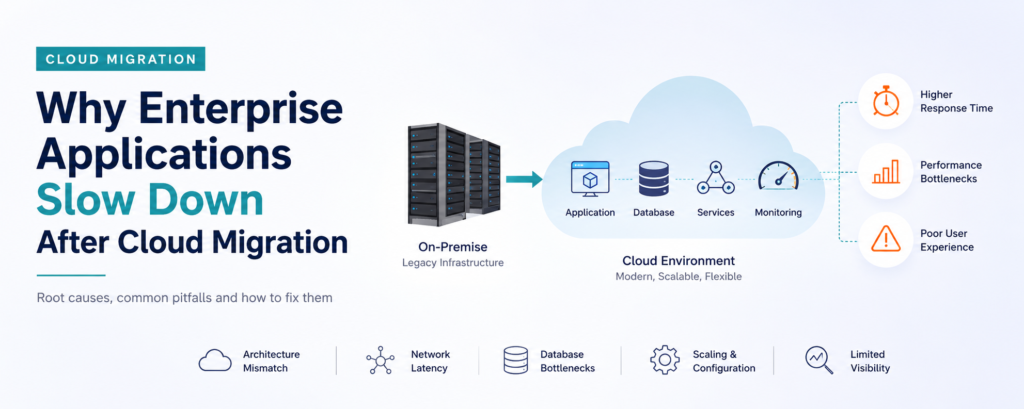
Enterprise applications slow down after cloud migration mainly because the underlying architecture, database design, and network paths were built for an on-premise data center, not for a distributed cloud environment. The cloud does not automatically make an application faster. It only makes infrastructure more flexible. Speed still depends on how well the application, its data layer, and its network calls are engineered for that new environment.
Most enterprises expect the opposite outcome. Leadership signs off on a multi-crore migration expecting snappier response times, easier scaling, and lower operational overhead. Then, three months after go-live, transaction times creep up, page loads stall, and the war room conversations start again, except now everyone is confused because “we just moved to the cloud.
The Cloud Migration Performance Paradox
Cloud platforms are built for elasticity, not instant performance. AWS, Azure, and GCP give you the building blocks: compute, storage, networking, and managed services. What they do not give you is a guarantee that your specific application, with its specific data patterns and user load, will run faster on those blocks than it did on your old servers.
This is the paradox most CIOs discover the hard way. A banking application that ran comfortably on dedicated on-premise hardware, with predictable disk I/O and a single-hop database connection, can behave very differently once it is split across availability zones, routed through load balancers, and dependent on a managed database service with its own throttling limits.
Performance in the cloud is a design outcome, not a platform feature. If the migration plan focused only on “lift and move” rather than “redesign for scale,” slowdowns are close to inevitable.
Common Reasons Enterprise Applications Slow Down After Cloud Migration
1. Lift-and-shift without re-architecture
Most enterprises migrate under tight deadlines. The fastest path is a lift-and-shift: pick up the existing VM or application stack and drop it onto cloud infrastructure with minimal changes. This works for the migration timeline but ignores the fact that cloud-native environments reward stateless, horizontally scalable designs. Monolithic applications that depend on local disk caching or in-memory session state often see response times degrade once they are split across multiple instances.
2. Network latency and data locality
On-premise, the application server and the database often sat in the same rack, sometimes the same switch. After migration, that same call might cross availability zones or even regions, adding milliseconds that compound across thousands of transactions per second. For BFSI and telecom workloads handling real-time payments or high concurrency, those milliseconds are the difference between an SLA breach and a smooth customer experience.
3. Misconfigured auto-scaling and instance sizing
Auto-scaling is one of the most misunderstood cloud features. Enterprises frequently under-provision baseline capacity to control cost, assuming auto-scaling will fill the gap instantly. In reality, scale-out events take time, and if scaling thresholds are set incorrectly, the application absorbs a spike in traffic before new instances come online, causing exactly the slowdown teams were trying to avoid.
4. Database and storage bottlenecks
Managed database services like Amazon RDS or Azure SQL Database come with their own connection limits, IOPS ceilings, and cold-start behaviors that on-premise databases never had. Applications that issue a high volume of small queries, or that were tuned for local SSD performance, frequently hit these ceilings post-migration, especially during peak load windows.
5. Dependencies not built for distributed environments
Legacy applications often assume synchronous, low-latency calls between internal services. In a distributed cloud architecture, those same calls may now traverse a service mesh, an API gateway, or multiple microservices, each adding its own overhead. Without redesigning these call chains, cumulative latency builds up invisibly until it shows up in end-user complaints.
6. Lack of real-time observability
On-premise teams often relied on infrastructure-level monitoring that does not translate well to distributed cloud environments. Without proper Application Performance Monitoring (APM) tuned for cloud-native services, teams cannot see where time is actually being lost, whether it is DNS resolution, a slow downstream API, or database contention. Diagnosis becomes guesswork instead of data-driven root cause analysis.
For distributed environments, Observability and Application Performance Monitoring provide the visibility needed to trace slow requests across services, databases, and network paths.
Common Mistakes Enterprises Make Post-Migration
- Assuming the cloud provider is responsible for application-level performance, when in reality the shared responsibility model only covers infrastructure availability, not your code or database design.
AWS’s Shared Responsibility Model also explains that customers remain responsible for application software and many workload configuration decisions.
- Migrating without establishing performance baselines beforehand, making it impossible to prove whether the new environment is actually faster or slower.
- Skipping load and stress testing that mirrors real production traffic patterns, including peak-hour concurrency and seasonal spikes.
- Treating cost optimization and performance optimization as separate workstreams, when right-sizing decisions directly affect both.
- Delaying observability tooling until after problems surface, instead of instrumenting the application from the first day in the new environment.
How Performance Engineering Fixes Post-Migration Slowdowns
Performance engineering is the discipline of designing, testing, and tuning systems for speed and reliability throughout the development and migration lifecycle, not just after something breaks. Applied to cloud migration, it typically covers four areas.
A structured Application Performance Engineering approach connects architecture decisions, performance targets, testing, and production monitoring.
Capacity modeling before migration. Understanding peak concurrent users, transaction volumes, and acceptable response times before a single workload moves, so the target architecture is sized correctly from the start.
Architecture validation. Reviewing whether the application’s design, from database calls to service dependencies, is genuinely suited to a distributed cloud environment, and flagging redesign needs before they become production incidents.
Realistic load and stress testing. Simulating actual production traffic, not synthetic best-case scenarios, using tools that mirror real user behavior and peak-hour patterns.
Avekshaa’s Performance Testing and Engineering service supports realistic workload validation and deeper root cause analysis.
Continuous monitoring and tuning. Implementing APM and observability that tracks latency, throughput, and error rates in real time, so performance regressions are caught within hours, not weeks.
Ongoing Application Performance Management helps teams track performance changes after releases, configuration updates, and workload growth.
Expert Insight
Based on engagements across BFSI, telecom, and retail workloads, one pattern shows up consistently: the enterprises that avoid post-migration slowdowns are the ones that ran performance validation in parallel with the migration itself, not after it. Waiting until user complaints arrive means the fix happens under production pressure, which is always more expensive and riskier than catching the same issue in a pre-production load test.
Pro Tips for a Faster Cloud Environment
- Set explicit non-functional requirements (response time, concurrency, error rate) before migration begins, not after.
- Run load tests using production-like data volumes, not sample datasets.
- Right-size compute and database tiers based on actual workload patterns, then revisit quarterly.
- Instrument APM at the transaction level, not just the infrastructure level, so you can trace a slow user request end to end.
- Treat the first 90 days post-migration as a tuning window, with a dedicated team watching key metrics daily.
Enterprises that have gone through this transition often find that performance engineering catches these gaps well before customers notice them, which is a very different experience from firefighting a slowdown that is already affecting revenue and customer trust.
Key Takeaways
- Cloud migration changes the performance equation. Infrastructure elasticity does not equal application speed.
- The most common causes of post-migration slowdown are architectural (lift-and-shift), network-related (data locality), configuration-related (auto-scaling and sizing), and observability-related (lack of real-time monitoring).
- Performance engineering, applied before and during migration rather than after, prevents the majority of these issues from ever reaching production.
- A structured 90-day post-migration tuning window, backed by proper APM, catches regressions early.
Is Your Enterprise Application Slower After Cloud Migration?
Get a Cloud Performance Assessment
Hidden network delays, database bottlenecks, misconfigured scaling, and architecture gaps can reduce performance after migration. Avekshaa helps enterprises identify root causes, improve reliability, and build a faster, more scalable cloud environment.
Frequently Asked Questions
Why does my application feel slower on the cloud than it did on-premise?
This usually happens because the application was moved without re-architecting it for a distributed environment. Network hops, database service limits, and auto-scaling delays introduce latency that did not exist when everything ran on local hardware in one data center.
Is cloud migration supposed to improve application performance automatically?
No. Cloud platforms provide flexible infrastructure, but performance depends on how well the application, database, and network design are optimized for that infrastructure. Migration alone does not guarantee speed gains.
What is the difference between performance testing and performance engineering in a cloud migration context?
Performance testing checks how the application behaves under load, usually close to or after go-live. Performance engineering is a proactive, end-to-end approach that designs for performance from the planning stage through architecture, coding, testing, and monitoring. For a practical enterprise approach, review Avekshaa’s Performance Testing and Engineering capabilities.
How soon after migration should performance issues be addressed?
Ideally, performance validation happens before migration and continues through the first 90 days after go-live. Waiting for user complaints means diagnosing problems under production pressure instead of in a controlled test environment.
Can auto-scaling alone fix cloud performance problems?
Not on its own. Auto-scaling helps absorb traffic spikes, but if scaling thresholds, cooldown periods, or instance sizing are misconfigured, the application can still experience slowdowns before new capacity comes online.
What industries are most affected by post-migration slowdowns?
BFSI, telecom, retail, and healthcare see the sharpest impact because these sectors depend on real-time transactions, high concurrency, and strict SLAs, where even small latency increases affect customer trust and revenue.
How does Avekshaa help enterprises avoid these issues?
Avekshaa’s Application Performance Engineering practice and P-A-S-S™ Assurance platform validate architecture, capacity, and performance before, during, and after migration, drawing on a repository of more than 5,000 resolved performance issues across BFSI, telecom, and retail engagements.